
Free tools

Software to help YouTube creators grow.

Four things, kept simple. Trinder.AI gives access to Jake’s AI assistant and his private tools. Lens analyses videos inside YouTube. The Transcript Downloader pulls the transcript out of any video or playlist. VideoCore offers standalone tools.

Jake Trinder at his desk above the Newcastle skyline

100 private keys · drop Thu 29 Oct 2026, 5pm UK

Get inside my head. Use what I use.

trinder.ai is my private stack. A live AI version of me, plus the proprietary tools I’m building and using behind the scenes. None of it has ever been available to anyone else. Until now.

In Jake’s words, from trinder.ai.

  • Free to join
  • Keys drop live, 29 Oct
  • Top of the list gets keys first
Jakeonline · synced todayPrivate

My videos get views but no leads. What would you change first?

Don’t touch the editing yet. It’s almost always a topic problem.

Here’s what I’d do this week. Pull the questions you hear on sales calls and make your next three videos answer them, in the words your buyers use.

Fewer views, way better viewers. Want me to look at your niche first?

Example conversation shown on trinder.ai.

Three free products. No account needed.

Lens, the Transcript Downloader and the VideoCore free tools work without signing up for anything. trinder.ai, above, is invite only. If you are new, Lens is the easiest place to start.

VideoCore Lens · free Chrome extension

A score on every video, as you browse YouTube.

Lens sits inside YouTube. Open any video and it shows how that video did against its own channel’s normal, counted from public numbers, so a small channel’s breakout shows up beside a big channel’s average day. No account and no credits that run out. It reads public YouTube numbers only, and it can never post to or change your channel.

  • On every video: the outlier multiple against the channel’s own average, a read of the title, thumbnail and opening, and what to change first.
  • On every channel: an A to F health grade across consistency, engagement, momentum and reach, the best recent outlier, and the one lever to pull.
  • Tools built in: transcript, thumbnail and comment downloads, on-device summaries, and a swipe file for titles and thumbnails worth keeping.
  • Counted, not modelled: views, likes, comments and dates from YouTube, compared by VideoCore’s own calculation. Where something was not measured, Lens leaves a blank rather than guess.
Add Lens to Chrome, free →

VideoCore YouTube Transcript Downloader · free Chrome extension

The transcript of any video, or a whole playlist, in any format.

Open a YouTube video and press the red Transcript button on the page. The extension reads the transcript YouTube already shows you and opens a panel with what to do next. It works on any video that has captions, which is most of YouTube. Free, no account.

  • Take it anywhere: download as text, SRT or VTT subtitles, Markdown for Obsidian or Notion, JSON or CSV, or copy it with a ready-made prompt for ChatGPT, Claude or Gemini.
  • Read, search, keep: read it beside the video (click a time to jump), search with highlights, save any line with a link to that moment, and translate into 15 languages on your device.
  • Written on your device: summary, key points, a blog draft and chapters are written by Chrome’s built-in AI, so the transcript is not sent anywhere. This needs Chrome 138 or newer on a device that can run it; if yours cannot, the copy-for-AI option still works.
  • Every video in a list: on a playlist, Watch Later or a channel’s Videos tab, collect up to 100 videos a run and get one file or a zip with a file per video.
  • Private by design: your transcripts and quotes never leave your browser. The only thing sent is an anonymous daily count of which buttons were used, and a switch turns it off. It never posts a comment for you.
The YouTube Transcript Downloader panel beside a video: copy, download in .txt, .srt, .vtt or .md, search, and click a time to jump to that moment
The panel beside a YouTube video: click a time and the video jumps there, and the line being said stays marked as it plays.
Add Transcript Downloader to Chrome, free →

Guides: get a transcript in any format, read, search and keep quotes, every video in a playlist. Privacy. Built by VideoCore with Jake Trinder. Not affiliated with YouTube; YouTube is a trademark of Google LLC.

VideoCore · the tools

Free tools to grow your channel

Channel Health Check, Why No Views, Outlier Finder, Niche Finder and Title & Thumbnail Check, each run on public YouTube numbers. Free and instant, no account and no card. The place Jake’s method first became software.

Use the free tools →

Useful Real Intelligence

Real tools. Live scoring. A method of their own.

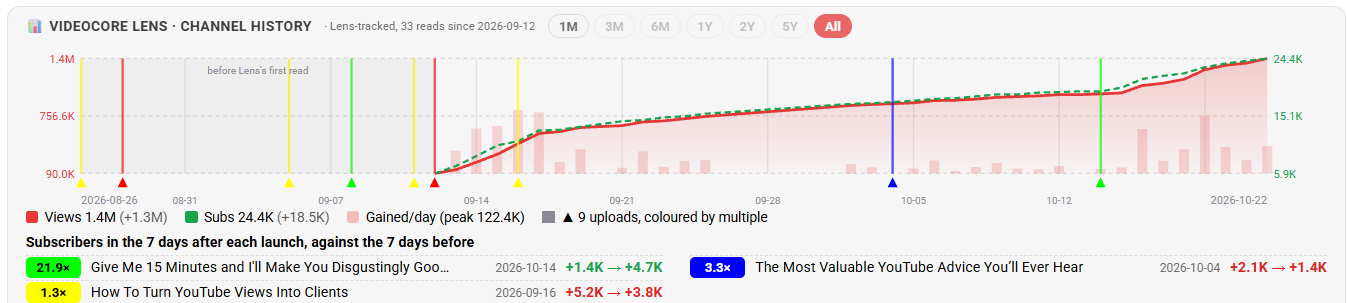
The same research Jake and the V2C team run on is published as free tools. This is VideoCore Lens reading Jake’s own channel.

VideoCore Lens channel history for Jake's channel: views and subscribers over time, with each upload coloured by its multiple and the subscribers gained in the 7 days after each launch against the 7 days before
VideoCore Lens, channel history for Jake’s channel, tracked since 12 September 2026 (33 reads). Calculated by VideoCore from public YouTube numbers, not a YouTube metric.

Every channel is scored from public numbers. A channel health grade out of 100, the biggest lever to pull, and each upload’s multiple against its own channel.

Every launch is read against a baseline. Subscribers in the 7 days after, against the 7 days before. A launch with no read within three days of either end is left out, never estimated.

“I’ve got my own internal AI tools around how I actually research.” Jake, 34:52

A taste of the process, in Jake’s words

“It basically makes sure that if you’re going to explore your niche on YouTube, you don’t miss a single corner”On depth-first search, 7:19
“A result can have more than one cause.”On reading a viral video, 30:15
“If you only research winners, you can prove any bad idea.”On positivity bias, 33:06
“Pre-publish research is still a hypothesis. The market gets the final vote.”On testing, 33:53

Beyond the tools

Want an enterprise-level, done-for-you service, or expert help? Get in touch today.

Views To Clients builds and runs business YouTube channels end to end. You record, the team does everything else. Start with a free 30-minute strategy call.

Book a free strategy call → Go to Views To Clients

Questions

Questions, answered.

Are the YouTube tools free?

Lens, the Transcript Downloader and the VideoCore free tools are free to try and need no account. Trinder.AI is invite only.

What does VideoCore Lens do?

It is a free Chrome extension. Open any YouTube video or channel and it shows how that video did against its own channel's normal, counted from public YouTube numbers.

What does the YouTube Transcript Downloader do?

It is a free Chrome extension. Open a YouTube video, press the Transcript button and it reads the transcript YouTube shows on the page, so you can copy it, download it as text, SRT, VTT, Markdown, JSON or CSV, read and search it beside the video, or collect every video in a playlist. It works on any video with captions. Your transcripts stay in your browser.

What is Trinder.AI?

A live AI version of Jake plus his private tools. 100 private keys drop on Thursday 29 October 2026 at 5pm UK, and registering is free.

One person. A connected brand family.